Purchase Order Module
Overview
Flow Chart
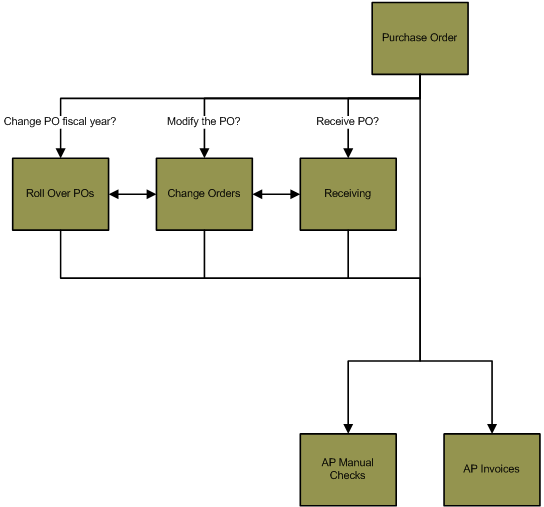
The objects in the diagram below represent processes in the application. Click on an object to view information about that process.
Purchase Orders Work Flow
- Purchase Orders are created using the Purchase Orders
process (PO> Purchase Orders).
Click here for an overview
of the Purchase Orders process.
- Once a Purchase Orders batch has been committed, the
POs in the batch can be:
- Modified using the Change Orders process (PO> Change Orders) - For
example, if you would like to add or remove a line item on a committed purchase
order, process the PO in a Change Orders batch.
Click here for information on the Change Orders process.
- Rolled over into a new fiscal year using the Roll Over POs process
(PO> Roll Over POs) - For example, if a purchase order is entered in fiscal year
2014, but the encumbered amount should be moved to fiscal year 2015, process the
PO through the Roll Over POs process. This will move the encumbered amount from
one fiscal year to another. Purchase orders can only be invoiced in the same
fiscal year that the encumbered amount has been recorded in. Click here for information on the Roll Over POs process.
- Received using the Receiving process (PO> Receiving) - For
example, if there are unit quantities attached to the PO line items, you can
receive the PO line items and generate a receipt. The receiving process is
optional, unless the Force Receiving toggle is checked on the AP module Setup
window (AP> Utilities> Setup> Invoices tab> Force Receiving toggle). If
the Force Receiving toggle is checked, you can only invoice purchase
orders with quantities that have been received in the PO Receiving process.
Click here for information on the Receiving process.
- Invoiced using the AP module Invoices process (AP> Invoices).
Click here for information on AP Invoices.
- Added to a manual check in the AP module using the Manual Checks
process (AP> Manual Checks).
Click here for
information on the Manual Checks process.
Springbrook Software
® All Rights Reserved 2014
Toll Free Support 866-777-0069